Made a yellow toy robot into a body for my AI assistant
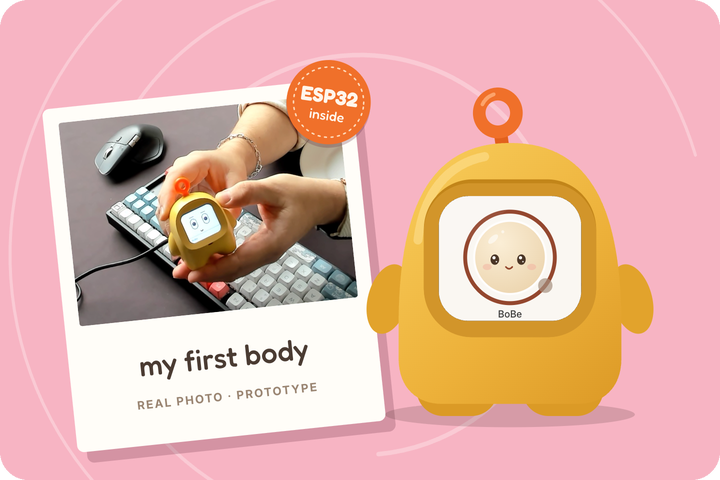
My AI assistant BoBe lived only on a Mac screen. On a trip to China for WAIC, I found a toy robot with the right chip inside and made it BoBe's body.
I’m building an AI assistant called BoBe. It lives on my Mac as a small face at the edge of the screen. You can talk to it, and it remembers what matters to you. But a face on a screen disappears the moment you open another window. I wanted BoBe on the desk next to me, as something you can pick up, press a button on and talk to.
On 11 July I wrote down a plan for that. I’d buy a developer board with a screen, a microphone and a speaker. All of BoBe’s thinking would stay on the Mac, and sound would stream between the two.
That July I travelled to China for WAIC, the World Artificial Intelligence Conference in Shanghai, which ran from 17 to 20 July. I saw the AI toy craze up close. MIT Technology Review had called AI toys “all the rage in China” the autumn before. They’re plush animals, pendants and small robots that talk to you through a chatbot in the cloud. On 16 July, the day before WAIC opened, I was backing up the memory of one of them, a yellow toy robot.
A toy with the right insides
The toy is the WonderBoy WB-12, sold as an “AI Buddy”. It’s a small yellow robot that fits in your hands. It has a screen for a face, a microphone, a speaker, a battery and one big button. It ships with its maker’s own AI firmware, and its store listing says it talks through Doubao, ByteDance’s chatbot.
The first clue to what runs inside came during setup. The toy opens a Wi-Fi network whose name starts with “Xiaozhi”. That’s the name of an open-source firmware for talking ESP32 gadgets, with more than 32,000 stars on GitHub. The toy’s firmware turned out to be a private fork of it.
Inside is an ESP32-S3, the same chip family as the developer board in my plan. It has 8 MB of extra memory, enough for a voice app, and 16 MB of flash for the firmware. Somebody had already designed, built and cased the hardware I wanted, and made it cute. All it needed was a different brain on the other end.
That last part shaped everything. A chip like this is excellent at jobs that need precise timing: reading the microphone, driving the screen, playing sound. It can’t run speech recognition or a language model at any quality worth talking to.
That’s why the robot is a body and never a brain. It listens, shows BoBe’s face and speaks. BoBe itself, with its memory, models and tools, stays on the Mac, and the robot holds no keys to any AI service.
Back up first, twice
Before I changed a single byte, I copied the robot’s whole 16 MB flash to my Mac. Then I did it again and compared the two copies.
They weren’t identical. 7,807 bytes differed, all in one small storage area. I had rebooted the robot between the two reads, and on boot it rewrites its radio calibration. So the rest of the image was a faithful copy.
The calibration also ties the image to this one robot. Writing it onto another WB-12 would give that robot the wrong radio settings.
Reading the flash had its own small lesson. At 921,600 baud the USB connection threw errors, and at 230,400 it read cleanly, so the recovery guide says to stay at 230,400 or below.
The dangerous part of an ESP32 is its eFuses, a small area of one-time memory. Each bit can be set once and never cleared.
One block of them, called Key0, holds the toy maker’s activation key, and the chip won’t let anyone read it. Touch it by mistake, and the factory firmware could never activate with its maker’s service again. The first rule in the robot’s guide is to never burn an eFuse. I also wrote a procedure that restores the factory flash from my copy.
Teaching it to be BoBe
Next came the part every hardware hack has: working out what is wired to what. That meant which pins the buttons use, how the screen and the audio are driven and how to read the battery. It all became a small board package in BoBe’s ESP32 kit. The rest of the firmware doesn’t need to know it runs on a toy.
The big button is push-to-talk. You hold it, speak and let go, and BoBe answers through the robot’s speaker, and its face on the screen shows what it’s doing. The two volume buttons do what you’d expect. A long press on one of them mutes the microphone, and it stays muted after a restart. That’s the right default for a device that sits in a room with people.
The robot and the Mac talk over a link where each side proves who it is with its own certificate. A robot only talks to its owner’s BoBe, and BoBe only to robots it has enrolled. Firmware updates are signed, so the robot only installs an update that I made.
A robot that presses the robot’s buttons
Testing a toy by hand gets old fast, so I’ve started a test rig for it. A Raspberry Pi Pico 2, wired across the robot’s buttons, presses them on command. A camera under a hood watches the screen, and a little router gives the robot its own Wi-Fi. A fixed speaker and microphone sit there to check the robot’s sound.
The rig is strict about what a test may claim. A test that only drew the face on my Mac counts as a drawing, and a test against a simulated robot counts as a simulation. Only a measurement on the real robot counts as physical. The audio part of the rig isn’t finished, so nothing in it claims yet that the sound works.
What’s still rough
The battery percentage still uses the factory’s guess, which nobody calibrated. A wake word exists as an option in one build, but push-to-talk stays the default until measurements show the wake word is worth it. And I’m not affiliated with the robot’s maker. Flashing a WB-12 replaces its factory app, so anyone who tries this should make that backup first, twice.
You press the button on a toy, and BoBe answers with the same memory it has on my Mac.